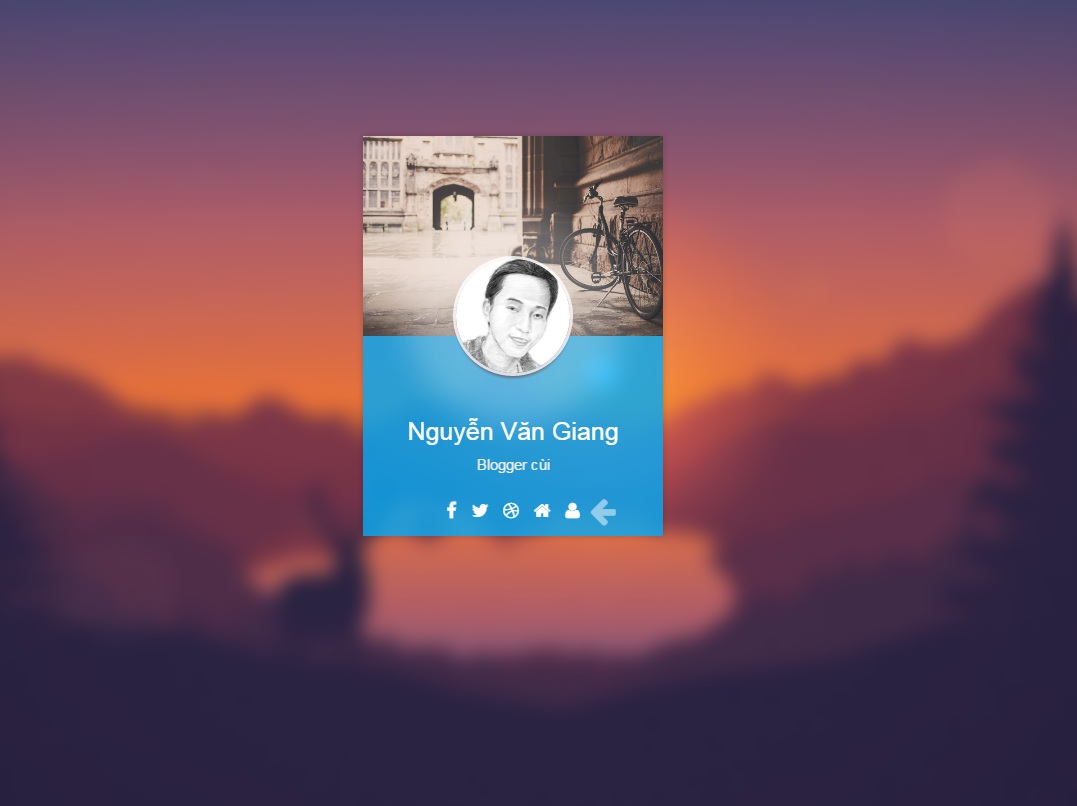
Code trang About đẹp cho Blogger.
Cách 1
Tạo 1 trang tĩnh (Static Pages) chuyển qua chế độ HTML copy code bên dưới dán vào, lưu lại.
Hướng dẫn tạo trang About cho Blogger
Cách 2 ( chách này khó hơn )
Tạo 1 trang tĩnh (Static Pages)
VD: abc/p/about.html
Sau đó vào chỉnh sủa HTML của template. Sử dụng thẻ điều kiện Blogger. và chèn ngay phía sau thẻ <body>
Nội dung hiển thị cho một URL chỉ định (thay URL_HERE bằng 1 URL bạn cần hiện thị)
<b:if cond=’data:blog.url == “abc/p/about.html”‘>
Code About
<b:else/>
Phần bố cục của Blog
</b:if>
Thay đổi Tên, link cho phù hợp với bạn
Code HTML CSS trang About
<style>
*{box-sizing:border-box;transition:.5s ease-in-out}
html,body{background-color:#220200;height:100%;overflow:hidden;font-family:helvetica neue,helvetica,arial,sans-serif}
html h1,body h1{font-size:25px;font-weight:200;color:white;line-height:30px;margin-bottom:10px}
html h2,body h2{font-size:15px;color:#eee}
#wrapper{opacity:0;display:table;height:100%;width:100%}
#wrapper.loaded{opacity:1;transition:2.5s ease-in-out}
#wrapper #content{display:table-cell;vertical-align:middle}
#card{height:400px;width:300px;margin:0 auto;position:relative;z-index:1;perspective:600px}
#card #front,#card #back{border-radius:0;height:100%;width:100%;position:absolute;left:0;top:0;transform-style:preserve-3d;backface-visibility:hidden;box-shadow:0 0 10px rgba(0,0,0,0.2)}
#card #front{transform:rotateY(0deg);overflow:hidden;z-index:1}
#card #front #arrow{position:absolute;height:50px;line-height:50px;font-size:30px;z-index:10;bottom:0;right:50px;color:rgba(255,255,255,0.5);animation:arrowWiggle 1s ease-in-out infinite}
#card #front #top-pic{height:50%;width:100%;background-image:url(https://lh3.googleusercontent.com/TVvR6XVycA194AGuZZrzjJ00rmMiBveve_Oh76crpmmtODy8B9MkkgW-9rYBTd9DpbYgyMqS=s630-fcrop64=1,000027a9ffffffff);background-size:cover}
#card #front #avatar{width:114px;height:114px;top:50%;left:50%;margin:-77px 0 0 -57px;border-radius:100%;box-shadow:0 0 0 3px rgba(255,255,255,0.8),0 4px 5px rgba(107,5,0,0.6),0 0 50px 50px rgba(255,255,255,0.25);background-image:url(http://i.imgur.com/Q1JUCrA.jpg);background-size:contain;position:absolute;z-index:1}
#card #front #info-box{height:50%;width:100%;position:absolute;display:table;left:0;bottom:0;background:rgba(3, 169, 244, 0.81);padding:20px}
#card #front #social-bar{height:50px;width:100%;position:absolute;bottom:0;left:0;line-height:50px;font-size:18px;text-align:center}
#card #front #social-bar a{display:inline-block;color:#fff;text-decoration:none;padding:5px;line-height:18px;border-radius:5px}
#card #front #social-bar a:hover{color:#FFC107;background:rgba(255,255,255,0.3);transition:.25s ease-in-out}
#card #back{transform:rotateY(180deg);background-color:rgba(255,255,255,0.6);display:table;z-index:2;font-size:16px;line-height:22px;padding:20px}
#card #back .back-info{text-align:left}
#card #back #social-bar{height:50px;width:100%;position:absolute;bottom:0;left:0;line-height:50px;font-size:18px;text-align:center}
#card #back #social-bar a{display:inline-block;line-height:18px;color:#0AABC0;text-decoration:none;padding:5px;border-radius:5px}
#card #back #social-bar a:hover{color:#fff;background:rgba(10, 171, 192, 0.74);transition:.25s ease-in-out}
#card .info{display:table-cell;height:100%;vertical-align:middle;text-align:center}
#card.flip #front{transform:rotateY(180deg)}
#card.flip #back{transform:rotateY(360deg)}
#background{position:fixed;background-color:black;top:0;left:0;height:100%;width:100%}
#background #background-image{height:calc(100% + 60px);width:calc(100% + 60px);position:absolute;top:-30px;left:-30px;-webkit-filter:blur(10px);background-image:url(http://i.imgur.com/2GkVaeg.jpg);background-size:cover;background-repeat: no-repeat;background-position: center;}
@keyframes arrowWiggle{0%{right:50px}50%{right:35px}100%{right:50px}}
</style>
<script>
window.console = window.console || function(t) {};
</script>
<script src='//assets.codepen.io/assets/libs/prefixfree.min-a2279db4c4c421e9795be3e1713aff75.js'/>
<body translate='no'>
<div id='wrapper'>
<div id='content'>
<div id='card'>
<div id='front'>
<div id='arrow'><i class='fa fa-arrow-left'/></div>
<div id='top-pic'/>
<div id='avatar'/>
<div id='info-box'>
<div class='info'>
<h1>Nguyễn Văn Giang</h1>
<h2>Blogger cùi</h2>
</div>
</div>
<div id='social-bar'>
<a href='https://www.facebook.com/giangblogger' rel='nofollow' target='_blank'><i class='fa fa-facebook'/></a>
<a href='/' target='_blank'><i class='fa fa-twitter'/></a>
<a href='/' target='_blank'><i class='fa fa-dribbble'/></a>
<a href='/'><i class='fa fa fa-home'/></a>
<a class='more-info' href='javascript:void'><i class='fa fa-user'/></a>
</div></div><div id='back'>
<div class='back-info'>
<p>Thế hệ 8X đời giữa, thích code và đặc biệt là Blogspot. bắt đầu 2008 với Blogger Việt [ bloggersviet.blogspot.com ] chia sẻ thủ thuật Blogspot, template blogspot,...</p>
</div>
<div id='social-bar'>
<a href='https://www.facebook.com/giangblogger' rel='nofollow' target='_blank'><i class='fa fa-facebook'/></a>
<a href='/' target='_blank'><i class='fa fa-twitter'/></a>
<a href='/' target='_blank'><i class='fa fa-dribbble'/></a>
<a href='/'><i class='fa fa-home'/></a>
<a class='more-info' href='javascript:void'><i class='fa fa-undo'/></a>
</div></div></div>
<div id='background'><div id='background-image'/>
</div></div></div>
<script src='//assets.codepen.io/assets/common/stopExecutionOnTimeout-ddaa1eeb67d762ab8aad46508017908c.js'/>
<script>
$(window).load(function () {
$('#wrapper').addClass('loaded');
});
$('.more-info').click(function () {
$('#card').toggleClass('flip');
$('#arrow').remove();
});
$('#background').click(function () {
$('#card').removeClass('flip');
});
//# sourceURL=pen.js
</script>
<script>
if (document.location.search.match(/type=embed/gi)) {
window.parent.postMessage("resize", "*");
}
</script>
</body>
Từ khoá và thẻ liên quan
Từ khoá:
Blogger
HTML Blogspot
Khám phá blog
Thủ thuật Blogspot